Are Smart Locks Safer Than Key Locks? Compare security, convenience, hacking risks, and key vulnerabilities to choose the safest option for your home.Smart locks can be safer than key locks when installed, updated, and managed with strong security habits. The question “Are smart locks safer than key locks?” has no single answer.
Both types can protect a home well, but they face different risks. A key lock may resist digital attacks, while a smart lock can reduce risks such as lost keys, lock picking, and copied duplicates. This guide explains how each system works, where each one can fail, and how to choose the safest option for your home.
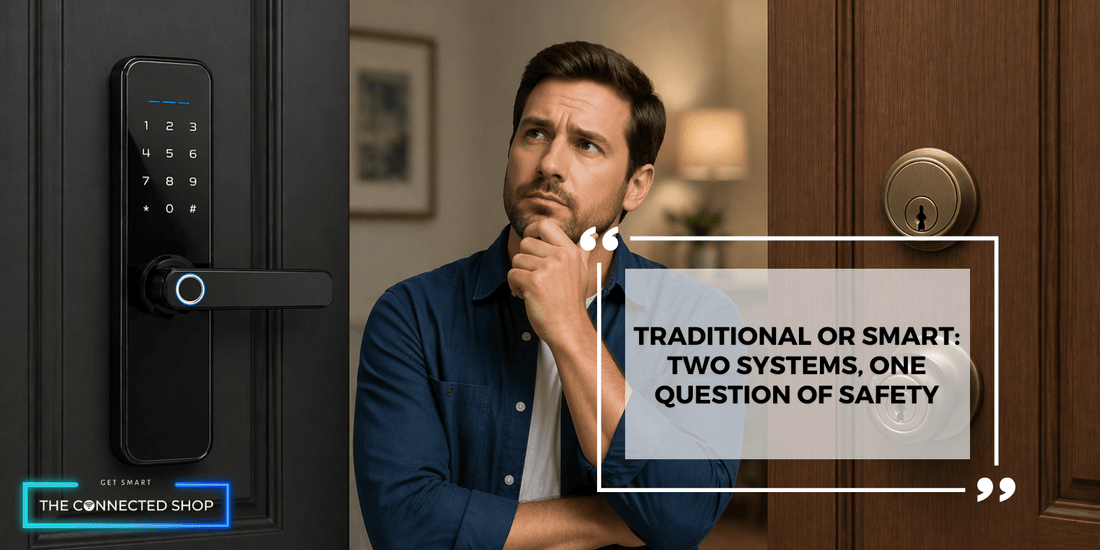
Source: theconnectedshop.com
How Smart Locks and Key Locks Protect Your Home
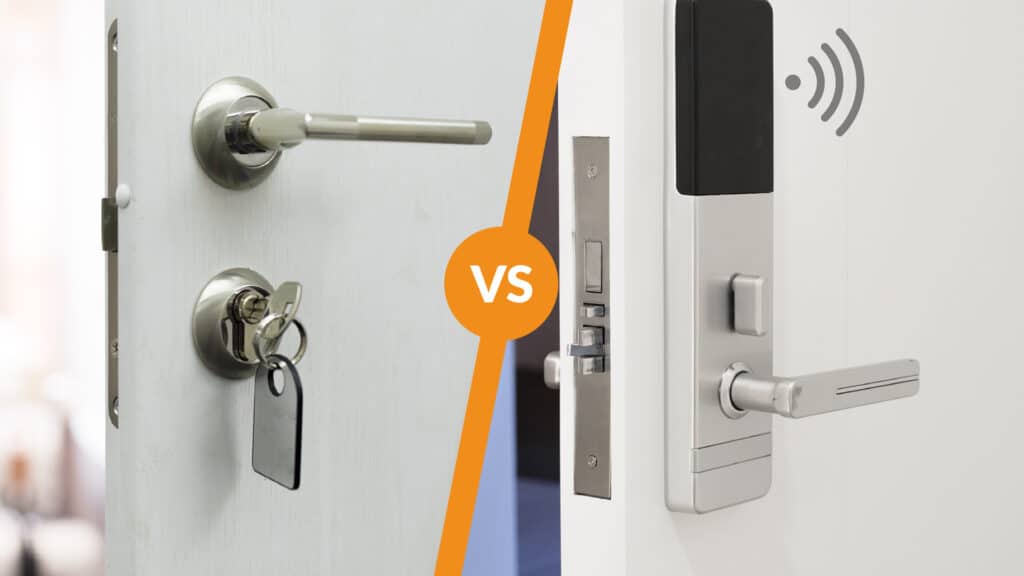
A key lock uses a physical key to move pins, discs, or other parts inside the lock cylinder. When the correct key aligns these parts, the cylinder turns and allows the door to open. Its security depends on the lock design, key control, door hardware, and the strength of the frame.
A smart lock uses an electronic motor or actuator to control the deadbolt. You may open it with a phone app, keypad code, fingerprint, voice assistant, or traditional key. Some models connect through Bluetooth, Wi-Fi, Z-Wave, or a home security hub.
The key difference is simple:
• Key locks depend mainly on physical security.
• Smart locks combine physical security with software, wireless communication, and user accounts.
This means smart locks add convenience, but they also add new points of failure. A strong smart lock still needs a solid deadbolt, a reinforced strike plate, and a well-built door. Technology cannot fix a weak door frame.
Source: tiltinwindowsdoorsandmore.com
Are Smart Locks Safer Than Key Locks in Daily Use?
In many homes, smart locks can be safer than key locks because they offer better control. You can create a temporary code for a guest, remove access after a contractor leaves, and review activity logs on some models. With a traditional key, you may never know who still has a copy.
Smart locks also remove several common key problems:
• Keys can be lost in public.
• Former tenants or workers may keep copies.
• A key can be copied without your knowledge.
• Family members may hide spare keys outside.
• A key can break inside the lock.
However, smart locks are not automatically safer. A weak account password, old firmware, or poor installation can create serious risks. If the lock connects to Wi-Fi, an attacker may target the account, the network, or the lock’s software.
The safest answer depends on how you use the system. A careful smart lock owner may have better access control than a person who gives spare keys to many people. On the other hand, a high-quality mechanical lock may be a better choice for someone who does not want to manage batteries, apps, or software updates.
So, are smart locks safer than key locks for everyday access? Often, yes, but only when convenience features are matched with good digital and physical security.
Physical Security: The Lock Is Only One Part
Many buyers focus on the lock and overlook the door. A smart lock or key lock can fail if the door, hinges, strike plate, or frame is weak. In real break-ins, criminals may attack the frame rather than defeat the lock itself.
Look for these physical features:
• A Grade 1 or Grade 2 deadbolt from a reputable manufacturer.
• A strong metal strike plate with long screws.
• Screws that reach the wall framing, not only the thin door jamb.
• A solid-core or metal exterior door.
• Protected hinges when the hinges face outside.
• A deadbolt with suitable resistance to forced entry.
The American National Standards Institute and Builders Hardware Manufacturers Association use performance grades for many residential locks. Grade 1 generally offers the highest level of residential and commercial performance, while Grade 3 provides basic residential protection. These grades do not make a door impossible to defeat, but they provide a useful comparison.
A smart lock with a weak latch is like a high-tech vault placed inside a cardboard box. The electronics may be impressive, but the complete entry system remains vulnerable.

Source: theconnectedshop.com
Key Lock Security: Strengths and Weaknesses
A good key lock has important advantages. It does not need a battery, internet connection, mobile app, or cloud account. A power outage usually has no effect on it, and remote hackers cannot attack a purely mechanical cylinder through the internet.
High-security key locks may use restricted keyways, anti-pick pins, anti-drill plates, and complex key designs. Restricted keyways can make unauthorized key duplication harder because only approved locksmiths or dealers may cut new keys.
Still, ordinary key locks have familiar weaknesses:
• Basic cylinders may be vulnerable to picking or bumping.
• Lost keys can allow unwanted entry.
• Many people keep spare keys in easy-to-find places.
• You may not know how many copies exist.
• Rekeying or replacing a lock can cost time and money.
Key control is often the largest issue. If you move into a home, you cannot be sure how many previous owners, cleaners, agents, or contractors have a key. Rekeying the locks is a sensible first step.
Are smart locks safer than key locks when the main concern is key duplication? Smart locks usually offer an advantage because access can be removed digitally. Yet a mechanical key override can still be copied, so the physical keyway deserves attention.

Source: doorsforpros.com
Smart Lock Security: Benefits and Risks
Smart locks offer several security benefits that key locks cannot provide. These benefits are especially useful for families, rental property owners, older adults, and people who frequently share access.
Main advantages of smart locks
• Temporary codes can expire after a set time.
• Unique codes can be assigned to different users.
• Access logs may show when the lock was used.
• Remote locking can help if you forget to secure the door.
• Some models send alerts about access attempts.
• A phone, fingerprint, or code can replace a physical key.
• Lost phones can often be removed from the account.
These features improve accountability. For example, you could give a dog walker access from noon to 2 p.m. on weekdays. When the arrangement ends, you can delete the code without changing the entire lock.
Smart locks also help people who have mobility issues. A keypad or app may be easier to use than inserting and turning a key. Some models connect with alarms, cameras, and home automation systems.
The risks are different:
• Batteries may run out.
• The app may stop working.
• The lock may lose wireless connectivity.
• An account may be compromised.
• A software flaw may affect the product.
• Poor privacy controls may expose access history.
• Voice assistants may create accidental unlock risks.
Security researchers have found weaknesses in some connected devices over the years. That does not mean every smart lock is unsafe. It means buyers should check the manufacturer’s update policy, encryption practices, vulnerability response, and support history.

Source: betechiot.com
Can Smart Locks Be Hacked?
Yes, smart locks can be hacked in some situations, but the risk is often misunderstood. An attacker may target the user’s account, phone, wireless connection, cloud service, or lock firmware. The exact risk depends on the model and how it is configured.
A smart lock is less exposed when it uses strong encryption, secure pairing, signed firmware updates, and a well-protected account. A lock that stores important functions locally may also reduce dependence on a remote cloud service.
Use these safeguards:
- Create a long, unique password for the lock account.
- Turn on multifactor authentication when available.
- Keep the lock app, phone, router, and firmware updated.
- Avoid using the same code for the lock and your alarm system.
- Do not share an administrator account with family members or workers.
- Remove old users and unused phones from the app.
- Secure your home Wi-Fi with WPA2 or WPA3 encryption.
- Turn off remote features you do not need.
- Review access logs from time to time.
- Protect the phone that controls the lock with a screen lock.
A digital attack is only one threat. Burglars may still use force, exploit a gap in the door, or target a different entrance. Home security works best as a layered system, not as one magical device.

Source: bodeandbode.com
Smart Lock Battery and Power Failure Concerns
Battery failure is one of the most common worries about smart locks. Most models provide a low-battery warning through the app, keypad, or audible signal. Even so, warnings are easy to miss.
Many smart locks include an emergency power method. This may be a nine-volt battery contact, a USB-C port, or a mechanical key override. Check this feature before buying the lock, and learn how it works before an emergency occurs.
A practical routine helps:
• Replace batteries on a fixed schedule.
• Use the battery type recommended by the manufacturer.
• Keep spare batteries inside the home and in a safe outdoor location.
• Test the emergency power method twice a year.
• Confirm that the deadbolt moves smoothly by hand.
• Do not ignore repeated low-battery alerts.
A jammed or poorly aligned door can drain batteries quickly because the motor must push against pressure. During installation, make sure the bolt extends smoothly without forcing the door. This small step can prevent many lockouts.
Are smart locks safer than key locks during a power outage? A well-designed smart lock can remain secure, but it may be less convenient. A key lock normally continues working without any power at all.
Privacy and Data Considerations
Smart locks may collect data about who unlocked the door and when. That information can help with safety, but it also raises privacy questions. Before purchase, read the company’s privacy policy and learn whether activity data is stored locally, in the cloud, or shared with third parties.
Consider these questions:
• Does the company require a cloud account?
• Can the lock work without internet access?
• Is access history encrypted?
• How long does the company retain activity records?
• Can you delete your account and stored data?
• Does the lock connect to a voice assistant?
• Will the manufacturer provide security updates for several years?
A local Bluetooth lock may collect less data than a Wi-Fi model with a cloud dashboard. However, local control can reduce remote access and may limit useful features. There is no perfect choice for every household.
Privacy matters most when several people use the home. Renters, caregivers, and landlords should explain what data is collected and who can view it. Clear rules prevent technology from becoming a source of stress.
How to Choose a Safer Smart Lock
When comparing smart locks, look beyond price and appearance. A reliable model should combine strong physical hardware with clear digital protections.
Use this checklist:
• Choose a reputable brand with a documented update policy.
• Look for a Grade 1 or Grade 2 deadbolt when suitable.
• Confirm that the lock supports strong encryption.
• Check whether multifactor authentication is available.
• Select a model with secure local or remote access options.
• Verify the emergency entry method.
• Review battery life claims and replacement costs.
• Check compatibility with your door and existing deadbolt.
• Avoid products with no clear support contact.
• Read recent security reviews, not only store ratings.
A retrofit smart lock may be easier to install because it replaces only the inside thumb turn. A full replacement model may offer stronger integration but require more careful fitting. If the door is old, warped, or difficult to close, repair it before installing electronic hardware.
In my experience with home access products, the most common mistake is buying for app features first, and door fit second. A lock can have a polished app and still perform poorly if the bolt rubs against the strike plate. Test the mechanical movement before trusting any electronic feature.
Are Smart Locks Safer Than Key Locks for Families and Rentals?
For families, smart locks can make access easier to manage. Each person can receive a personal code, and parents can avoid leaving keys under a mat. You can also delete a code when a child moves out, or a roommate leaves.
For rental homes, smart locks can reduce the need for physical key exchanges. Property managers may issue time-limited codes for guests, cleaners, and maintenance workers. This can improve organization and reduce rekeying costs.
Still, owners should set clear limits:
• Give each person a separate code.
• Avoid sharing one permanent code with everyone.
• Delete codes when a lease or service ends.
• Review activity records without invading reasonable privacy.
• Keep a physical backup access plan.
• Tell users not to share codes by public text or social media.
A smart lock is not a substitute for tenant screening, good lighting, secure windows, or a monitored alarm. It is one useful layer in a broader security plan.
Are smart locks safer than key locks for rentals? They can be, especially when access changes often. The benefit is greatest when the owner actively manages user permissions and updates.
Common Mistakes That Reduce Smart Lock Security
Even a strong product can become weak through poor setup. These mistakes are easy to avoid:
• Using a short or common access code.
• Leaving the default administrator password unchanged.
• Failing to remove former users.
• Ignoring firmware updates.
• Installing the lock on a damaged door.
• Sharing one code with every visitor.
• Connecting the lock to an unsecured router.
• Hiding a backup key near the entrance.
• Disabling alerts because they seem annoying.
• Buying a used lock without resetting it fully.
One lesson is worth remembering: convenience should not mean permanent access. Temporary users should have temporary permissions. If someone needs entry once, give that person a one-time code rather than your main code.
Also, do not rely on fingerprint access alone. Fingerprints can fail because of moisture, dirt, injury, or sensor problems. Keep a secure backup method, such as a code or physical key.
A Practical Security Setup for Any Front Door
You do not need the most expensive system to improve home security. A balanced setup can include:
- A solid exterior door with a quality deadbolt.
- A reinforced strike plate with long screws.
- A smart lock or high-security key lock from a trusted brand.
- Bright lighting near the entry.
- A door viewer or security camera.
- A tested alarm or door contact sensor.
- A clear plan for lost keys, lost phones, and lockouts.
- Regular checks of batteries, screws, and door alignment.
If you choose a smart lock, test it with the internet disconnected. Learn whether the keypad, Bluetooth connection, or physical key still works. If you choose a key lock, rekey it after moving in and control who receives copies.
The best system is one you can use correctly every day. A simple lock that stays maintained may protect you better than an advanced lock that is poorly installed or ignored.
Frequently Asked Questions
Are smart locks more secure than regular locks?
Smart locks can provide stronger access control, temporary codes, and activity records. Regular locks avoid digital threats and may be more dependable during power or internet problems, so security depends on the model and setup.
What happens if a smart lock battery dies?
Most smart locks warn you before the battery is empty. Many also provide emergency power contacts or a mechanical key override, but you should confirm these features before purchase.
Can someone break into a smart lock through Wi-Fi?
A vulnerable account, router, cloud service, or outdated lock may create a digital attack path. Strong passwords, multifactor authentication, secure Wi-Fi, and timely updates can reduce this risk.
Do smart locks work without the internet?
Many smart locks still work with a keypad, Bluetooth, or physical key when the internet is unavailable. Remote control and notifications may stop until the connection returns.
Are key locks safer during a power outage?
A mechanical key lock normally works during a power outage because it does not need electricity. A smart lock can also remain usable if it has battery power or a mechanical backup.
Can smart locks be picked?
Some smart locks still include a physical key cylinder, which may be picked or attacked like a traditional lock. Models without a keyway may reduce that specific risk, but they still need strong hardware and secure electronics.
Should I install a smart lock myself?
You can install many smart locks with basic tools if your door and deadbolt are correctly aligned. If the bolt sticks, the frame is damaged, or wiring is involved, a qualified locksmith or installer is the safer choice.
Conclusion
Are smart locks safer than key locks? They can be, but neither option is secure by default. Smart locks offer better access control, temporary permissions, alerts, and fewer concerns about copied keys. Key locks provide simple, reliable operation and avoid software, account, and battery risks.
The safest choice combines a strong lock with a reinforced door, careful user management, secure passwords, regular maintenance, and a backup entry plan. Choose the system that matches your habits, your home, and your comfort with technology. Compare reputable products, improve your door hardware, and share your experience or questions in the comments.