What Are the Top-Rated Smart Lock Brands for Home Security? Compare trusted brands, key features, compatibility, and security factors before buying. Schlage, Yale, Aqara, August, eufy, and ULTRALOQ are among the leading smart lock brands worth considering for home security.
The best choice depends on lock strength, access control, compatibility, reliability, and the level of smart home integration you need.
homeowners across the United States have several options when upgrading their front door security. Smart locks offer keyless entry, remote access, temporary guest codes, and automatic locking. These features can make daily life easier while giving homeowners more control over who enters their property.
However, not every smart lock offers the same level of protection. Some brands focus on traditional lock strength and dependable hardware. Others stand out through fingerprint access, smartphone controls, wireless connections, and smart home automation. A useful comparison must look beyond app features and consider the complete locking system.
Schlage andYale are strong starting points for buyers who value established door hardware. Aqara and ULTRALOQ offer attractive choices for people who want several unlocking methods. August is useful for homeowners who want to keep their existing deadbolt, while eufy provides convenient fingerprint and built-in Wi-Fi options.
This guide compares these six brands using documented product features, manufacturer specifications, compatibility information, and established smart lock review coverage. It does not claim that every model from one brand is more secure than every model from another. The exact lock, installation quality, door condition, and security settings all matter.
A trustworthy smart lock brand should offer more than a stylish design or a long list of app features. Its products should provide dependable mechanical operation, clear security information, reliable access controls, and useful support. Buyers should also be able to find installation instructions, compatibility details, and battery replacement guidance.
The first factor is mechanical protection. A smart lock still depends on physical parts, such as the deadbolt, bolt housing, strike plate, and mounting screws. A strong electronic system cannot make a weak door or poorly fitted deadbolt secure.
The second factor is digital protection. Smart locks connect to phones, wireless networks, or home automation systems. Their security depends partly on software updates, account protection, encryption, and the way users manage access permissions.
Finally, buyers should examine the exact model rather than judging a company by its brand name alone. Different models from the same manufacturer may have different hardware grades, wireless features, backup methods, and compatibility limits.
What Are the Top-Rated Smart Lock Brands?
What Are the Top-Rated Smart Lock Brands
Source: www.slashgear.com
Mechanical strength
Look for clear information about ANSI/BHMA grading, deadbolt construction, mounting hardware, and installation requirements.
Digital protection
Check whether the manufacturer documents encryption, software updates, account security, and access permission controls.
Reliable operation
Consider battery alerts, emergency power options, physical key access, and clear instructions for a lockout.
Long-term support
Review warranty terms, replacement parts, app support, firmware updates, and customer service availability.
What Are the Top-Rated Smart Lock Brands?
Understanding ANSI/BHMA Lock Grades
ANSI/BHMA grading is a useful way to compare tested door hardware. The American National Standards Institute and the Builders Hardware Manufacturers Association support standards used to assess different hardware products. Depending on the applicable standard, testing can examine strength, durability, and operational performance.
Grade 1 represents the highest level in the common three-grade classification, followed by Grade 2 and Grade 3. A Grade 1 rating can be a useful buying signal, especially for a frequently used exterior door. However, the grade must apply to the exact product and relevant standard. It does not automatically prove that the complete smart home system is protected against every physical or digital threat.
Do not confuse a manufacturer’s general security statement with an independently verified certification. Check the model documentation and the scope of the reported grade before making a decision.
Grade 1
The highest level in the common ANSI/BHMA three-grade classification.
Grade 2
A middle level that may suit many residential applications, depending on the door and intended use.
Grade 3
The entry level in the classification. Check whether it meets the needs of the intended exterior door.
1. Schlage: A Strong Choice for Traditional Door Security
Schlage is one of the first brands worth considering when shopping for a smart lock for an American home. The company has a long history in residential door hardware and offers electronic deadbolts that combine conventional locking components with modern access features.
Its Encode range is particularly relevant to homeowners who want a keypad and smartphone control in one product. Selected models offer built-in Wi-Fi, allowing users to manage compatible locks through the manufacturer’s app without buying a separate Wi-Fi bridge.
The Schlage Encode Plus is another notable option for Apple households. It supports Apple Home Key, which allows compatible iPhone and Apple Watch users to unlock the door using supported digital credentials. It also offers keypad access and smart home integration.
Schlage is a strong candidate for buyers who want a familiar deadbolt format rather than a complete change in how their exterior door operates. Its traditional hardware approach can also appeal to homeowners who prefer a physical key backup.
What Are the Top-Rated Smart Lock Brands
Source: smartlocksguide.com
Established hardware focus
Schlage offers residential deadbolts and electronic locks designed around familiar door hardware.
Keypad entry
Selected Encode models allow residents and approved guests to enter using personal access codes.
Smart home features
Supported models offer smartphone controls and integration with selected smart home platforms.
Apple Home Key
The Encode Plus supports compatible Apple devices and digital home keys.
What Are the Top-Rated Smart Lock Brands?
Who Should Choose Schlage?
Schlage is worth considering if your main goal is to upgrade an exterior deadbolt without giving up familiar locking methods. It is especially relevant for homeowners who want keypad access, remote management, and a well-known door hardware manufacturer.
Before purchasing, compare the exact Encode model and check its wireless requirements. The Encode Plus should not be confused with a Matter-enabled lock. Schlage’s published support clarification states that Encode Plus does not currently support the Matter protocol. Buyers who need Matter should verify another compatible model rather than assume that all smart locks support it.
Best fit
Homeowners seeking a traditional deadbolt replacement with modern access controls.
Main limitation
Smart home protocols and available features vary by model. Confirm compatibility before ordering.
What to Check Before Buying a Schlage Lock
Check the door thickness, backset, deadbolt configuration, and required installation space. Also consider whether you need remote access, Apple Home integration, or simple keypad operation. A less expensive model may be sufficient if you do not need advanced connected features.
Verify the model
Compare Encode and Encode Plus specifications instead of assuming their features are identical.
Check connectivity
Confirm the wireless connection and smart home platform required by your chosen model.
2. Yale: Versatile Smart Locks for Different Home Setups
Yale is another established name in residential door security. Its smart lock range includes keypad deadbolts, connected locking systems, and retrofit products. This variety makes the brand relevant to homeowners who want to choose between replacing an entire deadbolt and upgrading an existing lock.
The YaleAssure Lock family is worth examining if you prefer a keypad-based system. Depending on the model and configuration, Yale locks can support smartphone access, digital access codes, and integrations with selected smart home platforms.
One advantage of Yale is its range of connection options. Certain products use Wi-Fi modules, while others support technologies such as Z-Wave or Zigbee through compatible hardware. This gives buyers more flexibility, but it also means that model identification is essential.
Yale also has a relationship with August, which helps explain why some connected access products share features or app ecosystems. However, buyers should not assume that every Yale model uses the same software, module, or compatibility system.
What Are the Top-Rated Smart Lock Brands?
What Are the Top-Rated Smart Lock Brands
Source: yonannlock.com
Different installation styles
The range includes complete deadbolt replacements and selected retrofit solutions.
Keypad access
Compatible models allow users to create codes for family members and approved visitors.
Smart home flexibility
Selected Yale products support Wi-Fi, Z-Wave, Zigbee, or other connections through specific modules.
Useful access management
Compatible systems can provide digital access permissions and activity information.
What Are the Top-Rated Smart Lock Brands?
Is Yale a Good Choice for Homeowners?
Yale is a good brand to consider if you want a range of access styles and smart home configurations. It can suit households that need PIN codes for family members, remote access for approved visitors, or integration with an existing automation system.
The Assure Lock 2 range deserves particular attention. Different versions have different capabilities, so check whether the product includes Wi-Fi, a compatible smart module, a touchscreen, or another access feature. The physical door setup also matters. Yale’s compatibility guidance distinguishes between single-hole lever setups, standard two-hole deadbolt doors, and mortise-prepared doors.
Best fit
Homeowners who want multiple installation options and flexible access management.
Main limitation
Some smart features require an additional module or compatible hub.
Why Door Compatibility Matters With Yale
A smart lock may have excellent software but still be unsuitable for a particular door. Before ordering, measure the existing hardware and compare it with Yale’s official installation requirements. If your door uses a mortise lock or an interconnected locking system, a standard deadbolt product may not be suitable.
Measure first
Check the door thickness, backset, bore holes, and existing lock arrangement.
Check modules
Verify the exact module and smart home system supported by your Assure model.
3. Aqara: Advanced Smart Home Features and Biometric Access
Aqara is a strong option for buyers who want their door lock to work as part of a wider smart home system. The company focuses on connected home products, including sensors, cameras, controllers, and smart locks. Its products can appeal to homeowners who want to build automated routines around their entrance.
The Aqara Smart Lock U100 is a useful example. It offers a built-in fingerprint reader, keypad, mechanical key backup, and Apple Home Key support. The manufacturer states that its fingerprint reader can store up to 50 fingerprints. This can be useful for households with several regular users.
The U100 also supports Matter-related smart home integration through compatible equipment. However, buyers should pay attention to the manufacturer’s hub requirements. Some remote controls and automations need a compatible Aqara hub, so the lock itself may not provide every connected feature independently.
Another useful feature is the emergency USB-C power option. If the internal batteries run out, an external power source can help provide emergency power. This is a practical backup, although users should still monitor battery warnings and maintain a reliable replacement schedule.
What Are the Top-Rated Smart Lock Brands?
What Are the Top-Rated Smart Lock Brands
Source: whilehome.com
Fingerprint recognition
The U100 offers biometric entry and supports multiple stored fingerprints.
Apple Home Key
Compatible iPhone and Apple Watch users can unlock the door with supported digital credentials.
Smart home integration
Selected features work with Matter, Google Home, Alexa, and other supported systems.
Emergency power
The U100 includes a USB-C emergency charging option and a mechanical key backup.
Who Benefits Most From Aqara Smart Locks?
Aqara is particularly suitable for homeowners who already use compatible smart home equipment or plan to create a connected home. Fingerprint access can reduce the need to carry keys, while digital credentials provide another way to manage entry.
It may also suit Apple households that want the convenience of Home Key. However, not every Aqara lock has identical capabilities. Check the exact model, supported Apple devices, hub requirements, and regional availability before purchasing.
Best fit
Smart home users who want biometric entry and compatible automation features.
Main limitation
Some remote and automation functions depend on an additional hub or compatible smart home equipment.
Is Fingerprint Entry More Secure Than a PIN?
Fingerprint entry offers convenience because users do not need to remember or share a code. However, it is not automatically more secure in every situation. Fingerprint readers can have recognition problems with wet, dirty, or damaged fingers, and their performance depends on the sensor and its implementation.
A strong PIN can also provide reliable access when users keep it private and avoid predictable combinations. For the best practical result, choose a lock with more than one dependable unlocking method and keep a backup option available.
Fingerprint advantage
Convenient personal access without entering a code each time.
PIN advantage
Easy to share, change, or revoke for temporary visitors.
4. August: A Practical Retrofit Smart Lock Brand
August is especially interesting for homeowners who want smart access without replacing the entire exterior deadbolt. Its retrofit design works with compatible existing single-cylinder deadbolts and attaches to the interior side of the door.
This design preserves the outside appearance of the original lock and allows existing physical keys to remain in use. It can be useful for homeowners who like their current door hardware or renters who need to avoid unnecessary changes, subject to landlord approval and local lease requirements.
The August Wi-Fi Smart Lock offers smartphone control, remote access, automatic locking, and automatic unlocking features. The manufacturer also lists DoorSense technology, which can help users monitor the door’s position when installed and configured correctly.
One practical advantage is the reduced need to replace the complete deadbolt assembly. However, retrofit compatibility is not universal. The existing lock must meet the manufacturer’s requirements, and users should check the exact deadbolt configuration before ordering.
What Are the Top-Rated Smart Lock Brands
Source: bntrick.com
What Are the Top-Rated Smart Lock Brands?
Retrofit installation
Compatible models fit over the interior side of an existing single-cylinder deadbolt.
Keep existing keys
The original exterior key cylinder remains in place on compatible installations.
Remote access
Built-in Wi-Fi on selected models supports remote control through the August app.
Automatic operation
Supported settings include automatic locking and unlocking.
What Are the Top-Rated Smart Lock Brands?
When Should You Choose August?
August is worth considering when you want connected access while keeping your existing exterior hardware. It can be a sensible option for a home with a compatible deadbolt where a complete replacement is unnecessary.
It is also useful for households that want to continue using their regular keys while adding smartphone-based controls. This offers a middle ground between a conventional deadbolt and a complete smart lock replacement.
Best fit
Homeowners and approved renters who want to upgrade a compatible existing deadbolt.
Main limitation
Compatibility depends on the existing lock, and battery replacement remains part of ongoing maintenance.
What Should You Check Before Installing August?
Check that your existing deadbolt is a compatible single-cylinder model. Inspect the interior thumb-turn, available mounting space, and door alignment. If the deadbolt is stiff or difficult to turn manually, correct the mechanical issue before adding a motorized device.
Existing deadbolt
Confirm that the current lock appears on the manufacturer’s compatibility list.
Wireless connection
Check the Wi-Fi requirements and the location of your home router.
5. eufy: Convenient Fingerprint and Wi-Fi Smart Locks
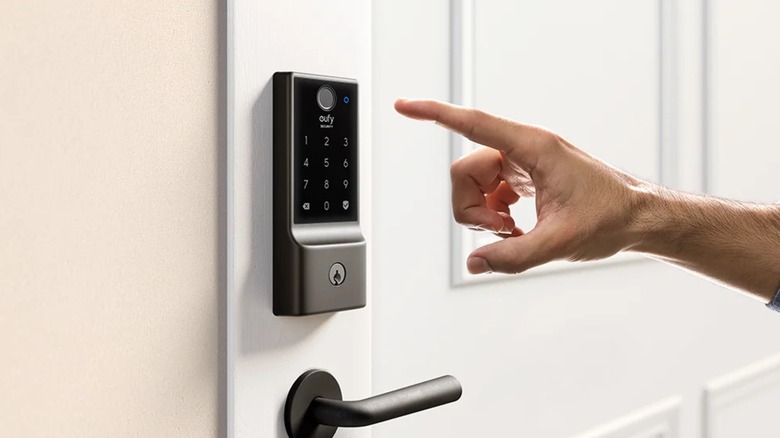
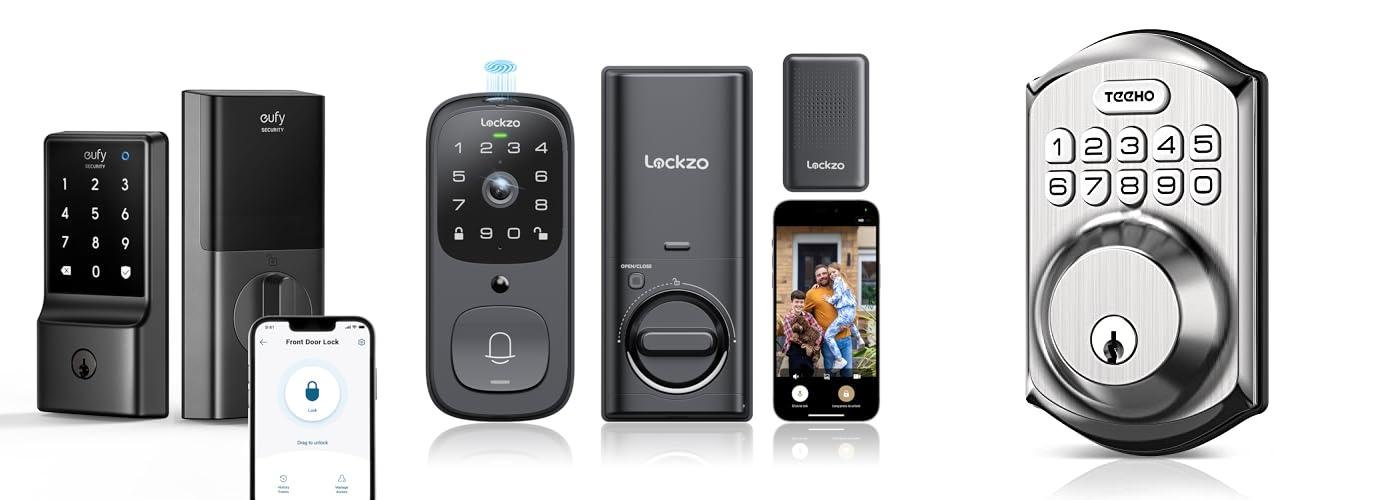
eufy is a useful brand to consider if you want a smart lock with several unlocking methods and direct wireless connectivity. Its Smart Lock C220 combines fingerprint recognition, a keypad, app control, a physical key, and voice assistant support through compatible services.
The C220 is particularly interesting because it includes built-in Wi-Fi. According to the manufacturer’s specifications, users can control the lock remotely through the eufy Security app without purchasing a separate Wi-Fi bridge. The app also supports access management, notifications, and event history.
The manufacturer lists an estimated battery life of around eight months for the C220, based on its stated usage conditions. Actual battery life can vary with usage frequency, wireless activity, environmental conditions, and battery quality. Users should treat the estimate as a guide rather than a guaranteed replacement interval.
Another practical feature is emergency USB-C power. If the batteries become depleted, an external power source can provide emergency power. The lock also includes a physical key, giving users another way to access the door.
What Are the Top-Rated Smart Lock Brands?
What Are the Top-Rated Smart Lock Brands
Source: helmetslab.com
Fingerprint unlocking
The C220 supports biometric entry through its built-in fingerprint reader.
Built-in Wi-Fi
Remote access is available through the manufacturer’s app without a separate Wi-Fi bridge.
Multiple access methods
Users can choose between fingerprints, PIN codes, app control, a physical key, and supported voice controls.
Emergency charging
A USB-C emergency power connection helps provide another recovery option when batteries are depleted.
What Are the Top-Rated Smart Lock Brands?
Is eufy a Good Brand for Everyday Home Security?
eufy can be a good choice for households that value convenience and multiple access methods. A fingerprint reader can make daily entry easier, while a keypad allows approved family members and visitors to use individual codes.
Its connected features may also appeal to people who already use other eufy security products. However, a smart lock should be judged on its own mechanical construction, security documentation, and compatibility rather than simply because it belongs to a larger security ecosystem.
Best fit
Users who want fingerprint access, app control, and several backup entry methods.
Main limitation
Battery life and connected performance depend on real-world use and installation conditions.
How to Maintain a eufy Smart Lock?
Keep the fingerprint sensor clean and follow the manufacturer’s battery guidance. Test the physical key and emergency power method before an actual battery failure. Also review access permissions from time to time and remove codes or users who no longer need entry.
Monitor batteries
Replace batteries when the app or lock indicates that power is running low.
Protect access
Use private PIN codes and review authorized users regularly.
6. ULTRALOQ: Multiple Unlocking Methods and Smart Connectivity
ULTRALOQ is another brand worth considering for homeowners who want flexible entry methods. Its product range includes smart deadbolts and other connected door hardware. Depending on the model, users may be able to unlock their doors with fingerprints, PIN codes, smartphone apps, NFC credentials, key fobs, or traditional keys.
The ULTRALOQ Bolt Pro is a notable product in its current range. The manufacturer lists several digital access options and support for Matter-compatible commands. Its product information also highlights local control for compatible Matter functions, which can help reduce dependence on cloud-based operations for supported actions.
The company also describes its hardware in relation to ANSI/BHMA performance standards. Buyers should still verify the exact model’s certification or test documentation instead of treating general references to standards as proof of a specific grade.
ULTRALOQ may appeal to people who want more ways to enter their homes. However, extra access methods are only useful when they are configured correctly. Each connected feature adds settings, permissions, and potential maintenance requirements that homeowners should understand.
What Are the Top-Rated Smart Lock Brands?
What Are the Top-Rated Smart Lock Brands
Source: makehomegood.com
Flexible entry
Selected models support fingerprint, PIN, app, NFC, key fob, and physical key access.
Matter support
Compatible products can support local control through supported Matter commands.
Different product designs
The range includes different deadbolt and door hardware configurations.
Smart home options
Compatibility varies by product and can include selected connected home platforms.
What Are the Top-Rated Smart Lock Brands?
Who Should Consider ULTRALOQ?
ULTRALOQ is worth comparing if your household wants several ways to unlock the front door. Fingerprint access can be useful for regular residents, while PIN codes and digital credentials can support visitors or family members who need temporary access.
It is also relevant to buyers who want to explore Matter-compatible smart home control. Before purchasing, confirm that the exact lock model supports the functions you need and that your existing smart home equipment meets its requirements.
Best fit
Households that value several entry methods and compatible smart home automation.
Main limitation
Features, connectivity, and hardware specifications differ across the product range.
Why Local Smart Home Control Can Matter
Local control allows compatible devices to communicate within the home network without requiring every action to travel through a remote cloud service. This can improve responsiveness and reduce dependence on an internet connection for supported operations.
However, local control does not mean that every remote feature works without internet access. Smartphone control from outside the home may still require an internet connection, an appropriate hub, and a supported configuration.
Local operation
Can support certain commands within a compatible home network.
Remote operation
May require internet access and additional connected equipment.
Smart Lock Brand Comparison: Which One Should You Choose?
The best smart lock brand depends on the features you value most. Schlage and Yale are sensible starting points for traditional deadbolt replacements. Aqara and ULTRALOQ deserve attention if you want biometric access and connected home features. August is especially useful when you want to retain a compatible existing deadbolt, while eufy offers a convenient combination of fingerprints and built-in Wi-Fi.
The following comparison summarizes the main strengths and limitations of these brands. It is a practical buying guide, not a laboratory security ranking. Individual models must still be checked against their current specifications.
A good option for buyers who want multiple entry methods and selected Matter-compatible features.
What Are the Top-Rated Smart Lock Brands?
Which Smart Lock Brand Is Best for Different Needs?
There is no single brand that wins every category. A homeowner who values traditional door hardware may prefer Schlage, while someone who wants a fingerprint reader may prefer Aqara, eufy, or ULTRALOQ. A renter with permission to make a reversible upgrade may find August more suitable.
For a home with an existing smart home hub, compatibility may matter more than the number of features advertised on the box. Check the exact device model, communication protocol, and required accessories before making the final decision.
Traditional deadbolt upgrade
Compare Schlage and Yale first.
Fingerprint entry
Compare Aqara, eufy, and ULTRALOQ.
Keep existing keys
Consider August and other compatible retrofit locks.
Smart home automation
Compare the exact Aqara, Yale, and ULTRALOQ models against your existing ecosystem.
How to Choose the Right Smart Lock for Your Home
Start by examining the door rather than choosing a lock based on its appearance. A smart lock must fit the existing door preparation and operate smoothly after installation. Check the door thickness, backset, bore holes, deadbolt type, and available interior clearance.
Next, decide how you want to manage access. Some households only need a keypad and physical key backup. Others may benefit from fingerprints, smartphone controls, automatic locking, or temporary guest codes. Choosing only the features you will actually use can reduce setup complexity and unnecessary costs.
Finally, review the ongoing requirements. Some locks need additional hubs, Wi-Fi bridges, subscriptions, or replacement batteries. These costs can affect the long-term value of a device, especially when several exterior doors need smart locks.
What Are the Top-Rated Smart Lock Brands?
Step 1: Inspect your door
Measure the door and identify the current lock type before comparing products.
Step 2: Set your security priorities
Decide whether mechanical strength, fingerprint entry, keypad access, or remote control matters most.
Step 3: Check compatibility
Confirm the lock supports your door, smartphone, wireless network, and preferred smart home platform.
Step 4: Compare ongoing costs
Review batteries, hubs, optional accessories, subscriptions, and warranty coverage.
Step 5: Plan installation
Follow the manufacturer’s instructions or hire a qualified locksmith if the door or existing hardware needs modification.
Consider Your Home’s Internet and Wireless Network
A smart lock’s wireless connection affects how you control it. Bluetooth often supports nearby smartphone access, while Wi-Fi can allow remote control when the lock and home network are configured correctly. Zigbee, Z-Wave, Thread, and Matter can support different types of smart home communication.
Do not assume that a Matter-compatible lock automatically offers direct Wi-Fi connectivity. Matter devices can use different network technologies, and some installations need a compatible hub or controller. Read the manufacturer’s connection requirements before buying.
Bluetooth
Useful for nearby control and selected smartphone functions.
Wi-Fi
Can support remote access through an internet-connected system.
Z-Wave and Zigbee
Useful in compatible smart home systems that use these wireless protocols.
Matter
Helps compatible devices communicate across supported smart home ecosystems.
What Are the Top-Rated Smart Lock Brands?
Check Battery Life and Emergency Access
Smart locks depend on batteries or another approved power source. Battery life varies with the number of daily operations, wireless activity, temperature, and device configuration. Look for low-battery warnings and understand how the lock behaves when power is depleted.
A physical key, emergency charging connection, or another manufacturer-approved backup can prevent an avoidable lockout. Test the backup method during installation rather than waiting for an emergency.
Low-battery alerts
Choose a system that clearly indicates when battery replacement is needed.
Backup entry
Understand whether the model supports a physical key or emergency power connection.
Battery maintenance
Use the battery type recommended by the manufacturer and replace batteries as instructed.
Common Smart Lock Security Mistakes to Avoid
Buying a well-known brand does not automatically make a home secure. Many problems come from poor installation, weak account protection, neglected batteries, or badly managed access codes. A few simple precautions can help reduce these risks.
One common mistake is focusing entirely on electronic features while ignoring the physical door. A strong smart deadbolt cannot compensate for a damaged frame, a weak strike plate, loose mounting screws, or a poorly aligned door.
Another mistake is reusing weak passwords. A smart lock account should have a unique, strong password and multifactor authentication when the service supports it. Keep the associated smartphone updated and protect access to the account.
Homeowners should also remove old guest codes and revoke access when a contractor, former tenant, or temporary visitor no longer needs entry. Digital access is convenient, but unused permissions can become a long-term security problem.
What Are the Top-Rated Smart Lock Brands?
Ignoring door strength
Check the door frame, strike plate, screws, and deadbolt alignment instead of relying on electronic features alone.
Using predictable PINs
Avoid birthdays, repeated digits, addresses, and other combinations that someone may easily guess.
Ignoring software updates
Install official firmware and app updates when available and review the manufacturer’s security guidance.
Sharing permanent codes
Use temporary or limited guest access where supported and remove permissions when no longer needed.
Forgetting batteries
Monitor battery warnings and test emergency access methods before they are needed.
Smart locks can face digital security risks, just like other connected devices. Potential weaknesses can involve compromised user accounts, insecure wireless connections, outdated software, or poor access management. This does not mean that every smart lock is easy to hack or that a traditional lock is automatically safer.
The best approach is to buy from a manufacturer that provides clear security information and ongoing software support. Use strong account credentials, enable multifactor authentication where available, keep devices updated, and avoid sharing access codes unnecessarily.
Protect the account
Use a unique password and available multifactor authentication.
Update software
Keep the lock firmware, smartphone, and companion app current.
Review permissions
Remove unknown users and outdated digital keys.
Should You Keep a Physical Key Backup?
A physical key backup can be useful because it provides another way to enter when electronic access fails. However, some smart locks use keyless designs, so buyers should understand the emergency access method before purchasing.
If your chosen model has a physical key, store spare keys securely rather than hiding them in obvious places near the entrance. If it uses emergency charging, keep a suitable power source available and learn how to use the connection.
Key backup
Keep a spare key in a secure location if the lock supports mechanical entry.
Emergency power
Know the approved external power method and connector for your model.
What Are the Top-Rated Smart Lock Brands?
What Are the Top-Rated Smart Lock Brands
Are Expensive Smart Lock Brands Always More Secure?
No. A higher price does not automatically mean a stronger lock or better protection. More expensive models may include fingerprint readers, larger touchscreens, advanced wireless features, premium finishes, or additional accessories. Those features can improve convenience without necessarily increasing resistance to physical attacks.
A more affordable lock may be a better purchase if it has suitable mechanical specifications, reliable access controls, the required connectivity, and clear manufacturer support. The important question is whether the product meets the actual needs of your door and household.
Compare the cost of the complete installation rather than the lock alone. A product may require a separate hub, keypad, bridge, or other accessory. Some services may also offer optional paid features, so check the current terms before committing.
Compare hardware
Check the exact lock grade, deadbolt construction, mounting system, and installation requirements.
Compare useful features
Pay for fingerprint access, remote control, or automation only when those functions meet a real need.
Check additional costs
Include hubs, accessories, replacement batteries, and any optional subscription fees.
Review support
Consider warranty coverage, software updates, replacement parts, and customer service.
What Are the Top-Rated Smart Lock Brands?
What Matters More Than the Price?
The most useful comparison combines physical security, digital protection, compatibility, and long-term reliability. A reasonably priced lock that fits the door properly may be more suitable than an expensive product with features your household never uses.
Also consider the cost of improving the door frame or strike plate. In some homes, improving weak physical hardware may provide more practical value than paying extra for additional electronic functions.
Mechanical protection
The lock, door, frame, and strike plate must work together.
Dependable access
The lock should provide reliable everyday entry and a clear emergency plan.
Long-term value
Consider support, maintenance, and compatibility over the expected service life.
Frequently Asked Questions: What Are the Top-Rated Smart Lock Brands
Q
What Are the Most Trusted Smart Lock Brands?
Schlage, Yale, Aqara, August, eufy, and ULTRALOQ are among the smart lock brands worth comparing. Schlage and Yale offer established door hardware options, while Aqara and ULTRALOQ provide several connected and biometric access features. August is useful for compatible retrofit installations, and eufy offers convenient fingerprint and Wi-Fi models. Always compare the exact model rather than relying on the brand name alone.
Q
Which Smart Lock Brand Is Best for Home Security?
Schlage is a strong starting point for homeowners who prioritize traditional deadbolt hardware and keypad access. Yale is another established option. However, the best choice depends on the exact product’s mechanical specifications, digital security features, installation quality, and compatibility. No brand can guarantee that a home will never experience a break-in.
Q
Are Smart Locks Safer Than Traditional Deadbolts?
Smart locks offer additional access controls, activity information, and remote management that traditional deadbolts usually do not provide. However, they also introduce electronic and account-related risks. A well-installed, appropriately graded mechanical deadbolt can provide strong physical protection. The best smart lock combines suitable mechanical hardware with secure software and responsible access management.
Q
Do Smart Locks Work Without Wi-Fi?
Many smart locks can still operate locally without Wi-Fi. Depending on the model, users may be able to enter through a PIN, fingerprint, physical key, or nearby Bluetooth connection. However, remote smartphone control and some smart home features may stop working when the internet or required hub is unavailable. Check the manufacturer’s offline operation instructions before purchasing.
Q
How Long Do Smart Lock Batteries Last?
Battery life varies by brand, model, battery type, temperature, daily usage, and wireless activity. Some manufacturers publish estimates ranging from several months to longer periods under stated test conditions. Actual performance may differ. Monitor low-battery warnings, follow the recommended replacement schedule, and understand the emergency access method.
Q
Can I Install a Smart Lock on My Existing Front Door?
Many smart locks are designed to fit standard residential deadbolt preparations, but compatibility is not universal. Check the door thickness, backset, bore holes, deadbolt configuration, and available interior clearance. Retrofit products such as compatible August models can preserve an existing single-cylinder deadbolt. If the door needs drilling, frame changes, or hardware modification, consult a qualified locksmith.
Q
Do Smart Locks Require a Monthly Subscription?
Many smart locks provide basic locking, unlocking, keypad access, and local app functions without a monthly subscription. However, connected services and optional features can differ by manufacturer and model. Check whether remote access, activity history, integrations, or other advanced functions require a paid service before purchasing.
✦ Wrapping Up
Conclusion
The top-rated smart lock brands for home security include Schlage, Yale, Aqara, August, eufy, and ULTRALOQ. Each offers different advantages, from established deadbolt hardware to fingerprint entry, retrofit installation, and smart home automation. There is no single winner for every household because door designs, security needs, and connected home systems vary.
Schlage and Yale are sensible options for homeowners who want familiar deadbolt hardware with modern access features. Aqara and ULTRALOQ deserve attention if biometric entry and smart home integration are priorities. August is a useful retrofit choice for compatible existing deadbolts, while eufy offers convenient fingerprint and built-in Wi-Fi features.
Before buying, verify the exact model’s mechanical specifications, installation requirements, wireless compatibility, battery backup, and warranty. A good smart lock should work reliably with your door and provide secure access without making everyday entry unnecessarily complicated.
Remember that a smart lock is only one part of home security. A strong door, reinforced frame, suitable strike plate, secure account, and well-managed access codes all contribute to better protection. Taking care of these details can make a greater difference than choosing a product simply because it has the highest price or the most features.
💡 Key Takeaway
Start by checking your existing deadbolt and door measurements. Then compare Schlage, Yale, Aqara, August, eufy, and ULTRALOQ based on mechanical security, required access methods, smart home compatibility, emergency entry, and ongoing costs. Choose the exact model that fits your door and security needs rather than relying on brand popularity alone.
Learn how to control smart home gadgets with Alexa voice using simple steps, routines, and skills. Boost convenience, security, and hands-free living today.
Wondering Where Can I Get The Leading Product Marketing Tool? Compare top platforms, pricing, and features to pick the best fit fast—expert tips inside.